Certified payroll software with the clarity of a spreadsheet
Start free trial — 14 days, no card See pricing
14-day free trial · No credit card · Fringe math verified to the cent by 5,000+ automated tests · WH-347-style PDF & Excel exports
WH-347-STYLE layout for convenience — not an official DOL filing tool. Not legal advice.
Everything a public-works crew needs for certified payroll — and nothing else
LeaveSheet Certified Payroll does one job: the WH-347-style report and its fringe reconciliation. No payroll processing, no HR suite, no per-worker pricing. Here is the complete list — if it isn't on it, it isn't in the product.
Workers & prevailing-wage classifications
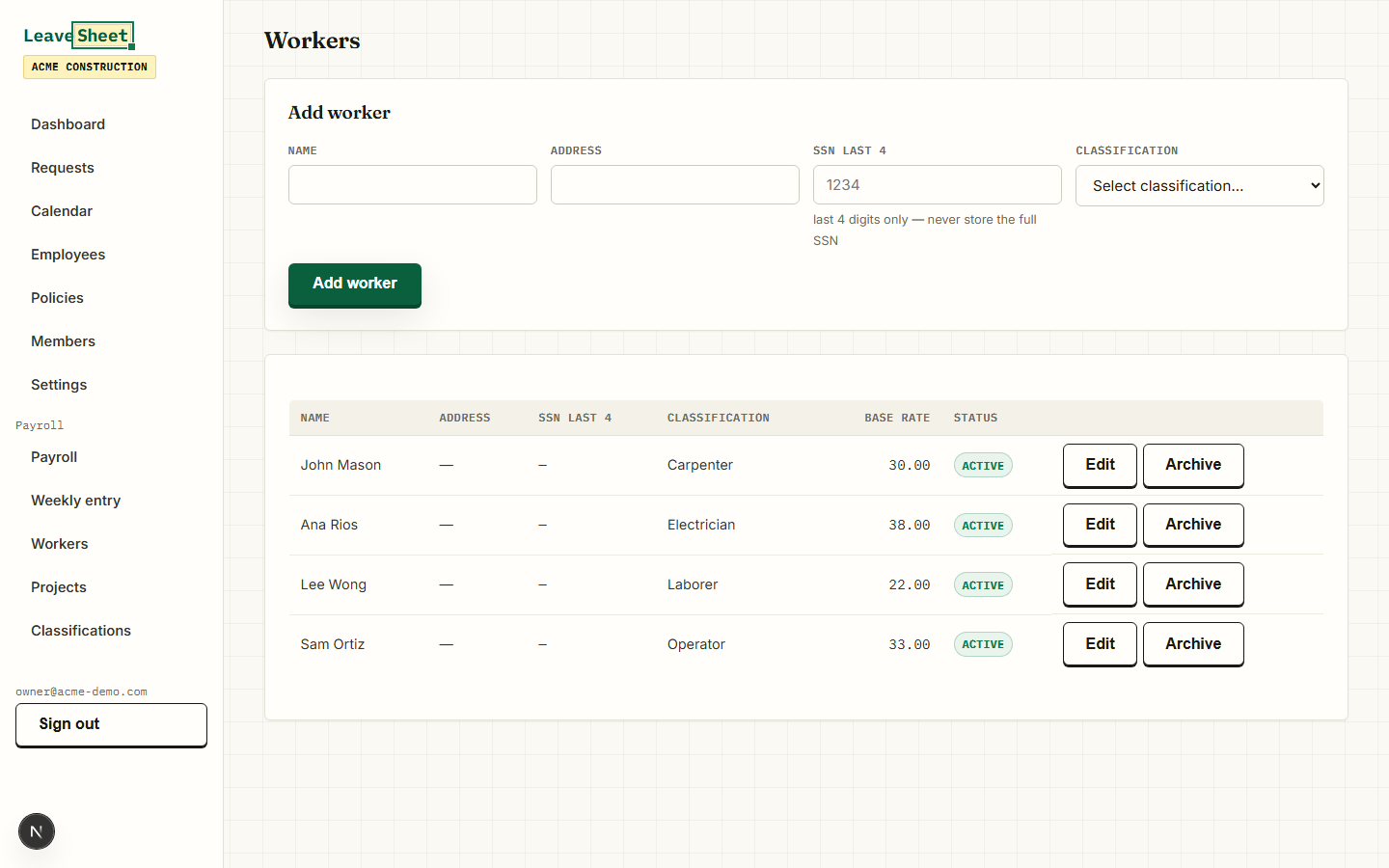
Set up each classification with its prevailing-wage base rate and four fringe plans — Health & welfare, Pension, Vacation/holiday and Training — plus an optional cash-in-lieu rate. Workers carry name, address, optional last-4 SSN, a classification and an optional journeyworker (J) or registered apprentice (RA) mark for column 2. Rates are entered by you; there is no automatic import of DOL wage determinations.
Weekly ST/OT hours grid
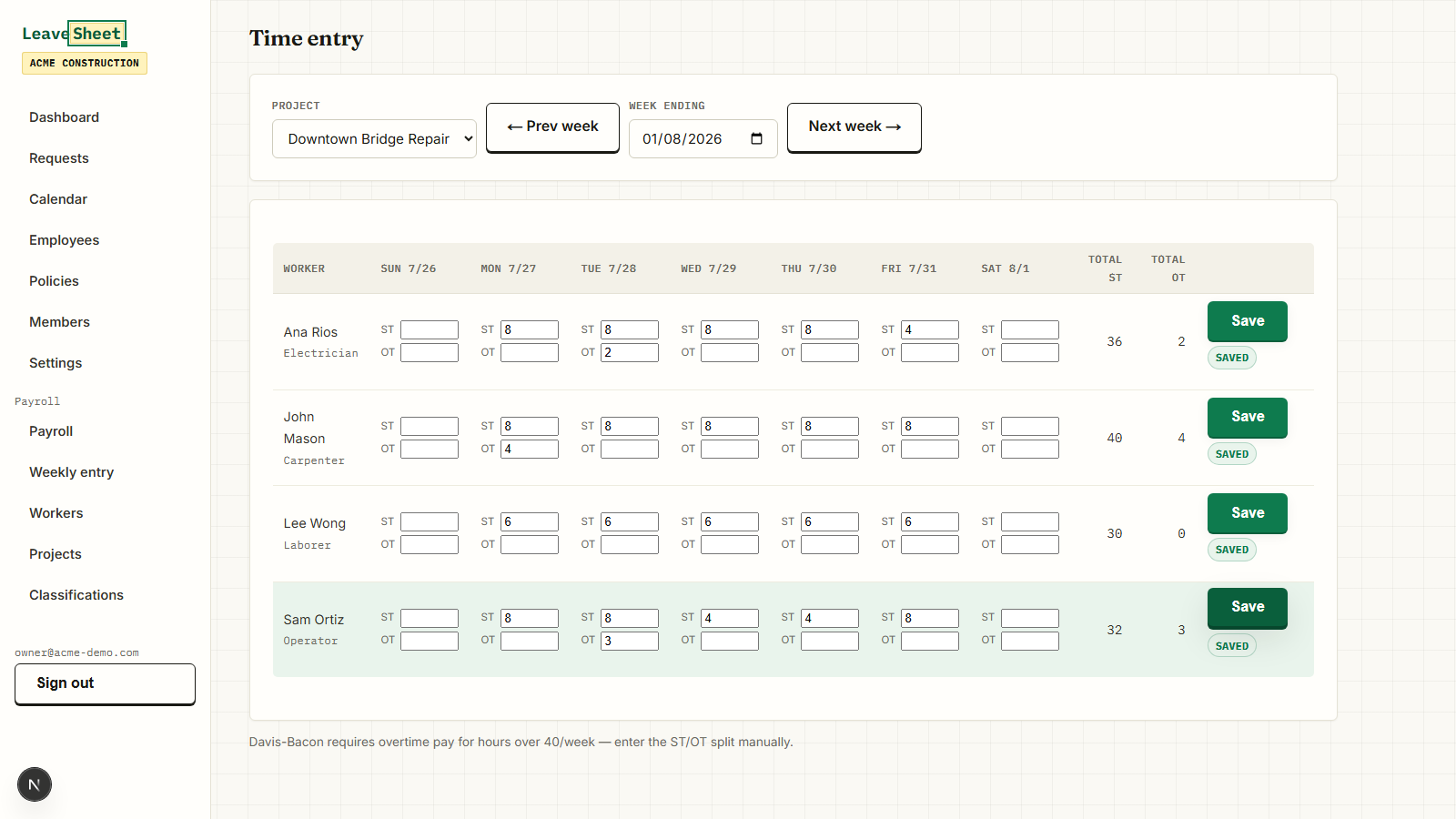
One row per active worker, seven days, straight-time and overtime hours entered separately per project per day, with live totals. The ST/OT split is manual (parity with our tested Excel file) — a tip reminds you that Davis-Bacon requires overtime pay for hours over 40 per week.
WH-347-style table, calculated
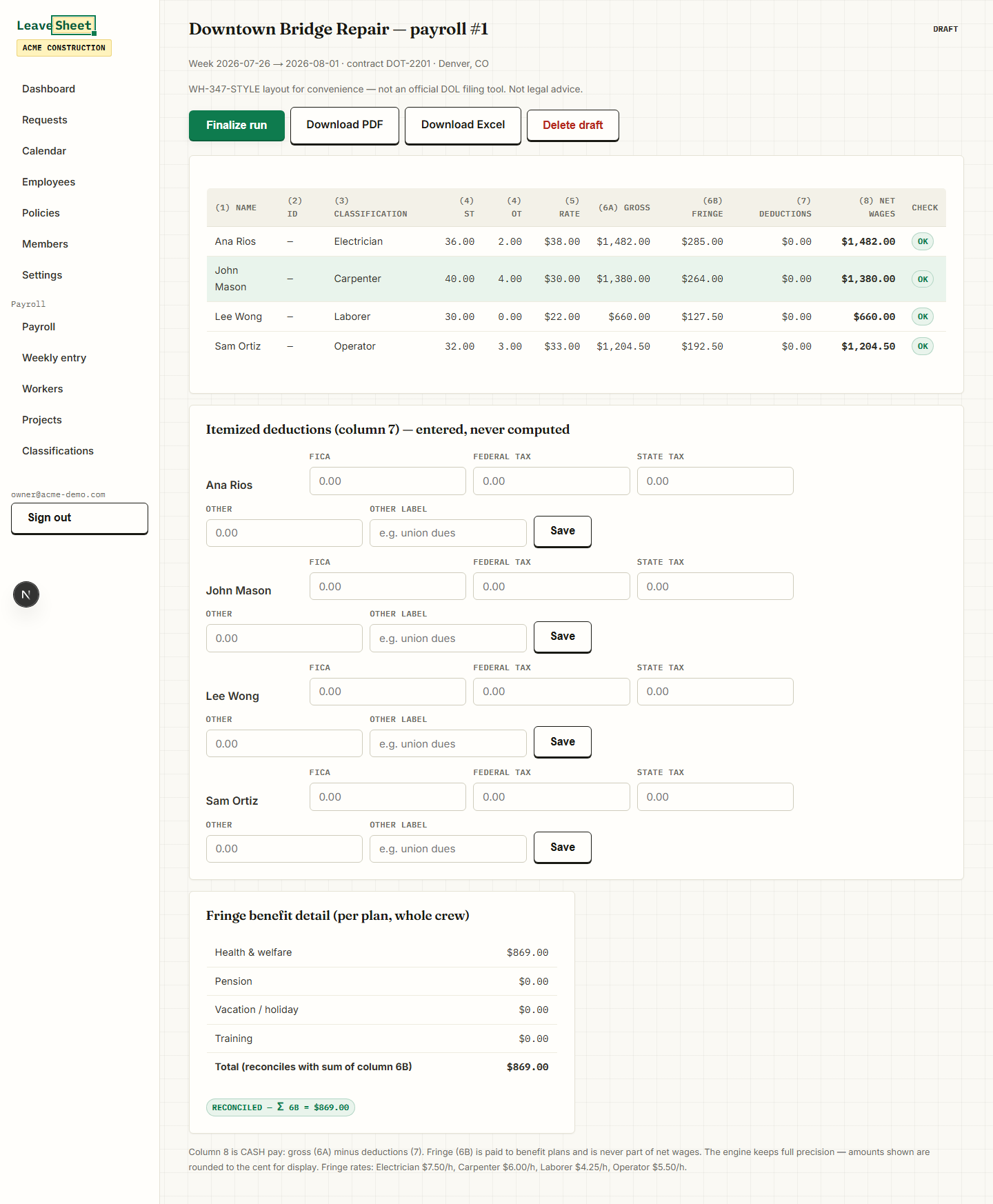
Gross (column 7A), fringe credit (column 6B), itemized deductions you enter (FICA, federal tax, state tax, other) and net wages (column 9) are computed live from your hours and rates. Overtime is paid at 1.5x the base rate; fringe is credited on every hour worked. Cash in lieu of fringe (column 6C) is hours times the rate you set on the classification and is added to gross. Gross for all work (column 7B) equals 7A unless you enter it; a 7B lower than 7A is flagged for review.
Automatic fringe reconciliation
Every run shows the total fringe owed per plan and proves that the four plan totals add up to the sum of column 6B — down to the cent. Nobody else surfaces this. It is the check a Statement of Compliance stands or falls on, done for you on screen.
Numbered, immutable payroll runs
A run is one project for one week ending. Payroll numbers auto-increment per project. Draft runs recalculate live; finalizing one snapshots every input so a certified payroll can never silently change. Corrections mean deleting a draft — never a finalized run.
WH-347-style PDF + Statement of Compliance
Download a two-page PDF: the columns of the revised WH-347 (Rev. January 2025, columns 1A to 9) with the fringe reconciliation line, plus the revised Statement of Compliance with its six boxes and the blanks (name, title, signature, date, telephone, email) for you to complete. Draft runs are watermarked. You submit the PDF yourself.
Styled Excel export
Export the whole payroll as a clean, formatted workbook — Company & Project, Workers, Weekly Entry, WH-347 Form and Statement of Compliance sheets — with the calculated values baked in. Your data stays portable, no lock-in.
Multi-project, manager and admin roles
Track as many projects as you run, each with its own WH-347 header (project & location, contract number, project number, wage determination number, prime or subcontractor, contractor name & address). The payroll module is manager-and-up only, so the crew never sees it. Everything is scoped to your organization.
An engine tested to the cent
The calculation engine is verified at parity against our tested Excel generator — the same math behind our $49 Construction Pack — with 5,000+ property tests and an independent oracle. What the file computes, the app computes, to the cent.
DOL WH-347 generator vs LeaveSheet
The U.S. Department of Labor publishes a browser-based web version of the WH-347. Here is what each one does, as of October 9, 2026.
| DOL WH-347 web generator | LeaveSheet Certified Payroll |
|---|---|
| Web tool, “no downloads, installations, or subscriptions needed” | $19/month or $190/year per company, after a 14-day free trial with no card |
| Automatic calculations | Gross, fringe credit, deductions and net wages per worker, kept in numbered weekly payroll runs |
| Print or save as PDF | WH-347-style PDF and Excel exports of each payroll run |
| “Your data never leaves your computer. We don't store your information on any servers.” | Your workers, classifications (base rate and fringe plans) and projects stay saved in your workspace; “Next week →” opens the same active crew with empty hours to enter |
See it for real
These are actual product screenshots, not mockups — from the payroll section every trial account can open.
Pricing that stays boring
Certified Payroll is a flat add-on to LeaveSheet — it is priced per organization, never per worker. Compliance platforms run $145–$1,300+/month-equivalent (LCPtracker LCPcertified public tiers, checked 2026-07-16); most competitors don't publish pricing at all.
+$19 / month, flat
Added to LeaveSheet ($1.50 per active employee / month, $9/month minimum). Any number of workers and projects — the payroll add-on price never changes.
+$190 / year, flat
The same add-on, billed yearly. Works out to about $15.83/month — flat, with no per-run or per-project fees.
14 days free, no card
The full payroll module is usable during your LeaveSheet trial. Explore it, run a real week, download the PDF — decide after.
Honest example: a small crew pays $9 (LeaveSheet base) + $19 (payroll add-on) = $28/month, total.
WH-347-STYLE layout for convenience — not an official DOL filing tool. Not legal advice.
What it doesn't do (yet)
We would rather you know before you sign up. LeaveSheet Certified Payroll does not:
- Process payroll. No paychecks, taxes, direct deposits or money movement — keep your existing payroll provider.
- File electronically. No eCPR, California DIR or state portal submission — you download and submit the PDF yourself.
- Import wage determinations. Prevailing-wage rates are entered by hand; there is no automatic DOL/SAM.gov sync.
- Track apprentice ratios or apprenticeship wage schedules. You can mark a worker J or RA with a progression level for column 2; nothing is computed from it.
- Integrate with ADP or QuickBooks — and it never touches how you pay people.
The same fringe math, as an Excel file
The app grew out of our test-certified Construction Pack. If a single file per project is enough, start there — or grab a free WH-347 template to see the layout.
Construction Pack ($49)Free certified payroll templateFree WH-347 form (Excel)
New to prevailing-wage reporting? Our certified payroll guide hub explains the WH-347, the Statement of Compliance and how submission works, state by state. Already track paid time off with us? Certified Payroll lives in the same app as LeaveSheet PTO tracking.
Compare before you commit
LeaveSheet vs LCPtracker
ComparisonLeaveSheet vs eBacon
ComparisonLeaveSheet vs Points North
Frequently asked questions
What is certified payroll software?
Certified payroll software helps contractors on Davis-Bacon and prevailing-wage jobs (federal or state public works) produce the weekly WH-347-style payroll report and Statement of Compliance that document each worker's classification, hours, gross wages, fringe benefits and deductions. LeaveSheet Certified Payroll does exactly this: it builds the report from the hours and rates you enter and reconciles the fringe benefits per plan — but you keep your own payroll provider and submit the report yourself.
Is this an official DOL filing tool?
No. LeaveSheet produces a WH-347-STYLE layout for convenience — it is not an official DOL filing tool, and nothing here is legal advice. It generates the PDF and Excel documents; you review, sign and submit them through whatever channel your agency requires.
How does fringe reconciliation work?
For each classification you enter four fringe rates (Health & welfare, Pension, Vacation/holiday, Training). The app credits fringe on every hour worked — straight time and overtime — and totals it per plan across all workers. It then proves that the sum of those four plan totals equals the sum of column 6B on the report, to the cent. That algebraic check is the differentiator: it is what auditors look for, and most tools leave it to you.
Do you file to eCPR, DIR or state portals for me?
No. There is no electronic filing (eCPR, California DIR, LCPtracker or other state portals) and no e-signature. LeaveSheet gives you the finished WH-347-style PDF and Excel files; you upload or mail them yourself. If your agency mandates a specific electronic portal, you will still use that portal.
How much does it cost and is there a trial?
LeaveSheet Certified Payroll is a flat $19/month or $190/year (about 17% off) per organization — not per worker — added to your LeaveSheet base plan ($1.50 per active employee per month, minimum $9/month). A small crew therefore pays about $9 + $19 = $28/month total. Everything is covered by the 14-day free trial, no credit card required.
Does it process payroll or pay taxes?
No. LeaveSheet is a reporting and compliance tool, not a payroll processor. It does not cut paychecks, calculate or file taxes, run direct deposits or handle deductions automatically — you enter the deduction amounts, and it produces the certified-payroll documents. Keep your existing payroll provider for the money movement.
How is it different from LCPtracker or eBacon?
Two ways: price and honesty about scope. Compliance platforms run roughly $145 to $1,300+ per month-equivalent (LCPtracker LCPcertified public tiers, checked 2026-07-16), and most competitors — including eBacon and Points North — publish no pricing at all. LeaveSheet is a flat $19/month add-on with pricing on the page. It does not do electronic filing or wage-determination imports, so if you need those, a heavier platform fits better. What it does do — the WH-347-style report and automatic fringe reconciliation — it does with the clarity of a spreadsheet.
Can I keep QuickBooks or ADP?
Yes. LeaveSheet never touches how you pay people. There are no ADP or QuickBooks integrations — and there don't need to be. You run payroll wherever you run it today, then enter hours, rates and deductions here to produce the certified-payroll paperwork.
Run a real week of certified payroll free
Add your classifications and rates, enter one week of hours, finalize the run and download the WH-347-style PDF — all inside the 14-day trial, no credit card.
WH-347-STYLE layout for convenience — not an official DOL filing tool. Not legal advice.